


[UPDATED 2026] Getting AI-103 Certification Made Easy!
AI-103 Exam Crack Test Engine Dumps Training With 159 Questions
NEW QUESTION # 34
You have an Azure subscription that contains an Azure Al Foundry instance named AI1.
You have an app that automatically triages and resolves issues presented in the log files of a system.
You create an incident manager agent and a DevOps agent that collaborate to resolve the issues.
You need to ensure that the incident manager agent can assign work to the DevOps agent. The solution must minimize development effort.
What should you do?
- A. Create a plugin for the incident manager agent.
- B. Create a plugin for the DevOps agent.
- C. Configure prompt flow for AI1.
- D. Configure a connected agent for AI1.
Answer: D
Explanation:
Ensuring that an incident manager agent can assign work to a DevOps agent in Azure AI Foundry is primarily achieved through a Connected Agents configuration. This setup allows a "main" agent to delegate tasks to "specialized" agents via natural language or defined function calls.
Key Implementation Steps
1. Configure Connected Agents
Within the Azure AI Foundry portal, you must register the DevOps agent as a "Connected Agent" of the incident manager.
2. Define Tool-Based Delegation
Use the ConnectedAgentToolDefinition in the Azure Python SDK or C# SDK to programmatically link them. This exposes the DevOps agent to the incident manager as a callable "tool".
3. Implement Handoff Orchestration Patterns
Choose an orchestration pattern that fits the triage-to-resolve workflow.
4. Manage Context and State
5. Enable Permissions and Roles
Reference:
https://learn.microsoft.com/en-us/azure/ai-foundry/agents/how-to/connected-agents
NEW QUESTION # 35
Hotspot Question
You need to create a new resource that will be used to perform sentiment analysis and optical character recognition (OCR). The solution must meet the following requirements:
- Use a single key and endpoint to access multiple services.
- Consolidate billing for future services that you might use.
- Support the use of Azure Vision in Foundry Tools in the future.
How should you complete the HTTP request to create the new resource? To answer, select the appropriate options in the answer area.
NOTE: Each correct selection is worth one point.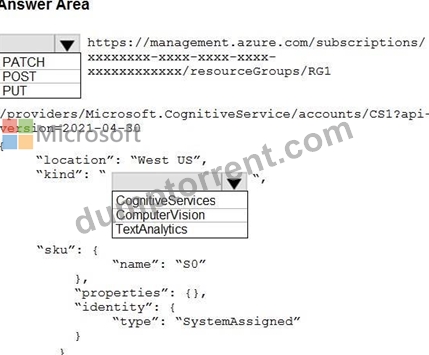
Answer:
Explanation: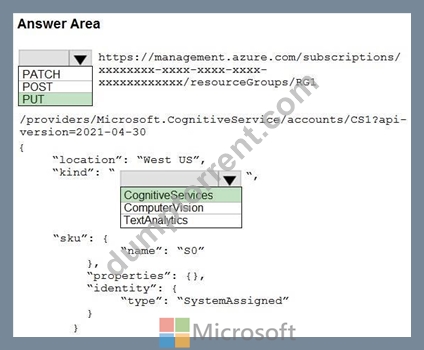
Explanation:
Box 1: PUT
Need to create a Cognitive Services Multi-Service resource using the PUT method. This specific resource type provides a single endpoint and key for multiple AI services, consolidates billing, and supports Azure Vision.
Box 2: CognitiveServices
Using the CognitiveServices kind creates a multi-service resource. This fulfills all the requirements by providing a single key and endpoint for multiple services, consolidating billing, and enabling access to features like Azure AI Vision and Text Analytics under one roof.
Reference:
https://learn.microsoft.com/en-us/azure/foundry/how-to/develop/sdk-overview
NEW QUESTION # 36
You have a Microsoft Foundry project that contains an agent. The agent has a Model Context Protocol (MCP) tool that queries a knowledge base stored in Azure AI Search.
Some agent runs return answers from the base model without invoking the knowledge base, which results in responses without grounded citations.
You are provided with the following code snippet that runs the agent.
You need to add the correct tool _choiceparameter to the code to deterministically force the agent to invoke the MCP tool on each run.
What should you add?
- A. tool_choice ={"type":"mcp"}
- B. tool_choice={"auto"}
- C. tool_choice={"type":"knowledge_base"}
- D. tool_choice={"required"}
Answer: D
Explanation:
To deterministically force the agent to invoke your Model Context Protocol (MCP) tool on every run, you must pass tool_choice="required" into the run_create_and_process method.
The 'required' tool choice: Setting this parameter to 'required' forces the underlying Azure OpenAI model to invoke one of your available tools on every response, ensuring the agent doesn't guess answers from the base model.
Reference:
https://learn.microsoft.com/en-us/azure/foundry/agents/concepts/tool-best-practice
NEW QUESTION # 37
A production application authenticates to Microsoft Foundry using an API key stored in an environment variable. Your security team requires that you remove hardcoded secrets and enable per-principal auditing of every call. Which approach meets both requirements?
- A. Share a single API key across services and restrict it with IP allow-listing
- B. Embed the API key in the deployment pipeline as a masked variable
- C. Authenticate with Microsoft Entra ID using a managed identity (keyless)
- D. Move the API key into Azure Key Vault and rotate it monthly
Answer: C
Explanation:
Keyless authentication with Microsoft Entra ID issues short-lived OAuth bearer tokens scoped per principal, which removes hardcoded secrets and produces per-principal audit trails. A managed identity extends this to service-to-service calls without storing any credential in code or configuration.
NEW QUESTION # 38
You have a Microsoft Foundry project that contains an agent. The agent generates summaries from retrieved policy documents.
You need to improve response completeness. The solution must be implemented in the logic of the application code before responses are returned.
What should you do?
- A. Decrease the value of the max_tokens parameter.
- B. Replace the model with a smaller deployment.
- C. Switch to Retrieval Augmented Generation (RAG).
- D. Add a retry evaluation before the responses are returned.
Answer: D
Explanation:
To enhance response completeness in your Microsoft Foundry agent, you must intercept the retrieved documents and the generated summary within your backend application logic before returning the payload to the user.
1. Implement Completeness Verification Logic
Add a verification step in your orchestration code (e.g., in your Python/Semantic Kernel or LangChain pipeline) that compares the generated summary against the retrieved chunks.' Map Key Assertions: Extract main policy rules from retrieved text.Cross-Reference Entities: Verify all key entities are in the summary.
Check Scope Coverage: Ensure every retrieved document is represented.
Scan for Gaps: Identify critical missing constraints or exceptions.
2. Apply Application-Level Mitigation Strategies
If the verification step detects that the summary is incomplete, use your code to correct it before the final response leaves your system.
Reference:
https://dev.to/moonrunnerkc/how-i-built-a-verification-layer-for-copilot-clis-multi-agent-output-4b7h
NEW QUESTION # 39
You have a Microsoft Foundry project that contains three agents as shown in the following table.
You need to orchestrate the agents to ensure that the customer requests meet the following requirements:
- Support a deterministic, step-based process that uses conditional
branching and shared state across the agents.
- Optionally trigger a ticket action based on the triage result.
The solution must minimize development effort.
What should you include in the solution?
- A. separate agent runs coordinated in the application code
- B. threads and runs without a workflow
- C. a multi-agent group chat session
- D. a workflow
Answer: D
Explanation:
To fulfill your requirements while keeping development effort to an absolute minimum, you should leverage the native Microsoft Foundry Multi-Agent Workflows feature (built directly into the Foundry Agent Service and managed via the Foundry portal visual editor or declarative YAML files).Using this visual, low-code orchestration layer removes the need to write custom graph routing logic, state managers, or manual handoffs in code.
The minimum required architecture and features that must be included in your solution are structured below.
1. The Orchestration Layer: Declarative Workflow
Instead of writing a code-first orchestrator, you must define a Foundry Workflow Definition (YAML or Visual).
2. State Management: Shared Context Variables
3. Agent Configuration & Native Tooling
Reference:
https://devblogs.microsoft.com/foundry/introducing-multi-agent-workflows-in-foundry-agent-service/
NEW QUESTION # 40
You have a Microsoft Foundry project that contains a model deployment.
You have an application that calls the deployment by using the Azure OpenAI v1 API and DefaultAzureCredential.
The developers at your company receive HTTP 403 errors when they send inference requests, even after running az login.
You need to ensure that the developers can perform model inference. The solution must follow the principle of least privilege.
Which role-based access control (RBAC) role should you assign to the developers?
- A. Cognitive Services OpenAI User
- B. Cognitive Services Data Reader
- C. Contributor
- D. Cognitive Services User
Answer: A
Explanation:
To resolve the HTTP 403 Forbidden errors when making inference calls via the Azure OpenAI v1 API and DefaultAzureCredential, users must be assigned the Cognitive Services OpenAI User built-in Azure RBAC role.
Why This Happens
Running az login successfully authenticates the user with Microsoft Entra ID, but it does not grant data-plane access permissions. By default, standard control-plane roles (like Reader or Foundry User) only allow users to view project metadata or manage settings, not send prompts to the model deployment endpoint itself.
Recommended Role Definition
Role Name: Cognitive Services OpenAI User
Permissions Granted: This role provides the absolute minimum privileges required to execute chat completions, embeddings, and general inference tasks (Microsoft.CognitiveServices/accounts/OpenAI/deployments/search/action and Microsoft.CognitiveServices/accounts/OpenAI/deployments/causalLanguageModeling/action). It does not allow users to deploy new models, view access keys, or alter configurations Scope Placement: Assign this role to the users (or a Microsoft Entra ID Group) at the Azure OpenAI resource level or the Resource Group level containing your Microsoft Foundry infrastructure.
Reference:
https://learn.microsoft.com/en-us/azure/foundry-classic/openai/how-to/managed-identity
NEW QUESTION # 41
You have an application that processes scanned PDF invoices. The invoices have varied layouts and include multipage tables.
You have a pipeline that uses optical character recognition (OCR) and extracts totals and invoice numbers. The results are often incorrect because the document structure is ignored.
You need to implement a solution that provides OCR, layout analysis, and template-generalizing field extraction. The solution must NOT require training a custom model. The solution must minimize administrative effort.
What should you include in the solution?
- A. Azure Language in Foundry Tools
- B. Azure Content Understanding in Foundry Tools
- C. an Azure Machine Learning model
Answer: B
Explanation:
The most appropriate solution is Azure Content Understanding in Foundry Tools.
The Azure Content Understanding service natively combines advanced Optical Character Recognition (OCR), deep layout analysis, and pre-built generative capabilities. It handles varied document structures, multi-page tables, and template-generalizing field extraction without requiring custom machine learning model training. It operates as a low-administration, out-of-the- box solution perfectly aligned with document intelligence needs.
Incorrect:
[Not A]
Azure Language in Foundry Tools: Azure AI Language focuses primarily on unstructured text analytics, sentiment analysis, text summarization, and conversational capabilities. It lacks the built-in document layout analysis, table parsing, and visual OCR capabilities necessary to process complex scanned PDF invoice structures.
[Not C]
Azure Machine Learning model: Building, training, deploying, and managing a custom model in Azure Machine Learning requires significant data science expertise. This approach introduces high administrative overhead, complex infrastructure management, and manual pipeline maintenance, which violates the requirement for low administration.
Reference:
https://learn.microsoft.com/en-us/answers/questions/5706482/azure-document-intelligence-and-content-understand
NEW QUESTION # 42
You have an Azure subscription that contains an Azure OpenAI resource.
You deploy the GPT-4 model to the resource.
You need to ensure that you can upload files that will be used as grounding data for the model.
Which two types of resources should you create? Each correct answer presents part of the solution.
NOTE: Each correct selection is worth one point.
- A. Azure Blob Storage
- B. Azure AI Bot Service
- C. Azure AI Document Intelligence
- D. Azure AI Search
- E. Azure SQL
Answer: A,D
Explanation:
Azure OpenAI On Your Data enables you to run advanced AI models such as GPT-35-Turbo and GPT-4 on your own enterprise data without needing to train or fine-tune models.
For some data sources such as uploading files from your local machine (preview) or data contained in a blob storage account (preview), Azure AI Search is used.
Reference:
https://learn.microsoft.com/en-us/azure/ai-services/openai/concepts/use-your-data
NEW QUESTION # 43
You have a Microsoft Foundry project that contains an agent.
You need to enable long-term memory to ensure that the agent can recall user preferences across separate conversations. Stored memories must be isolated per authenticated user without the client application manually generating user IDs.
How should you complete the Python code? To answer, drag the appropriate values to the correct targets.
Each value may be used once, more than once, or not at all.
NOTE: Each correct selection is worth one point.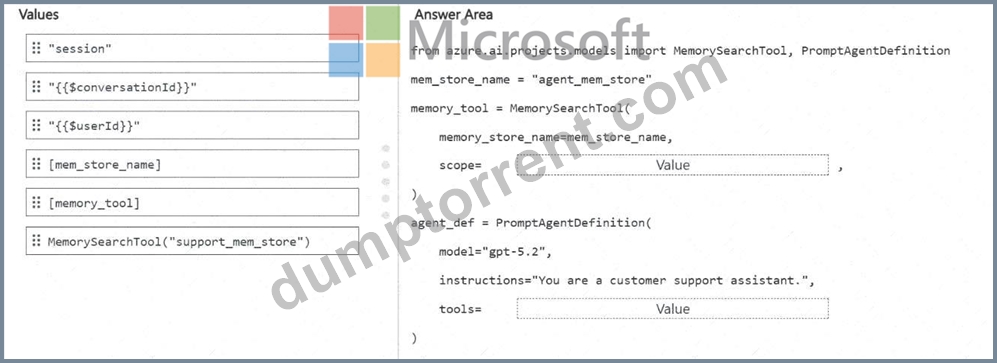
Answer:
Explanation: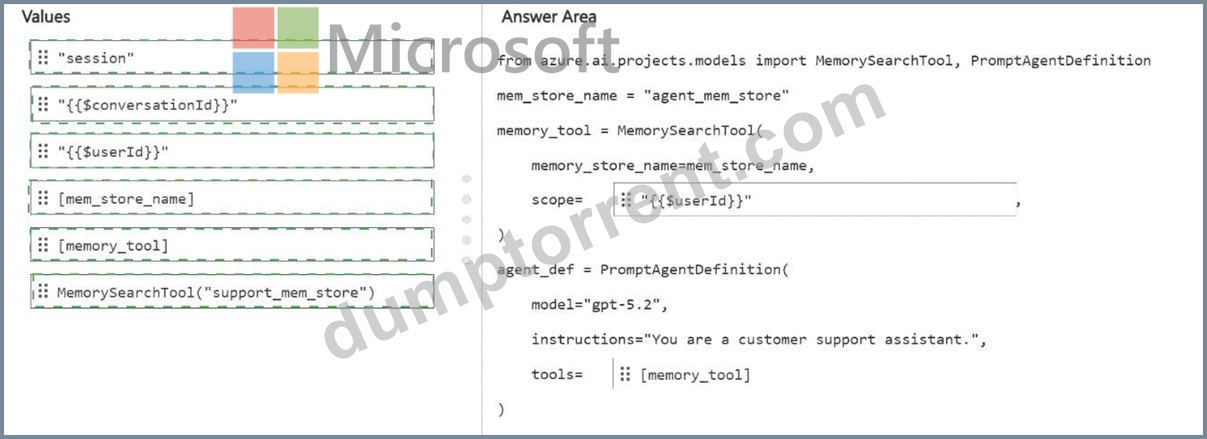
Explanation:
scope = " {{userId}} "
tools = [memory_tool]
The correct scope value is {{userId}} because the requirement is per-authenticated-user memory isolation without the client application manually generating user identifiers. In Microsoft Foundry Agent Service memory, the scope parameter partitions memory items inside the memory store. The official guidance states that when the memory search tool is attached to an agent, setting scope to the user identity template enables per-user memory isolation; the service resolves the end-user identity from the request header when provided, or falls back to the Microsoft Entra tenant ID and object ID of the caller. This matches the requirement to isolate stored preferences by authenticated user automatically.
The tools property must be [memory_tool] because the MemorySearchTool instance is created earlier and must be attached to the PromptAgentDefinition. Foundry guidance shows the memory search tool being passed in the agent definition as tools=[tool] , allowing the agent to read from and write to the configured memory store during conversations.
" session " and {{conversationId}} would limit continuity to a session or conversation instead of enabling long-term recall across separate conversations. [mem_store_name] is a list containing the store name, not a tool definition. Reference topics: Foundry Agent Service memory, memory stores, memory search tools, scope, and per-user isolation.
NEW QUESTION # 44
You have a Microsoft Foundry project that contains a customer support agent. The agent calls an internal knowledge API tool before generating responses.
Users report the following issues:
- Some requests take more than 15 seconds to complete.
- Some responses are incorrect, even when the knowledge API returns the expected data.
You need to inspect individual agent runs to view the ordered sequence of large language model (LLM) calls, tool invocations, and timing information.
Which observability capability should you use?
- A. monitoring
- B. token usage
- C. safety metrics
- D. tracing
Answer: D
Explanation:
Here is LLM tracing (also known as trace view or distributed tracing for GenAI) needed.
Tracks Execution Flow: It captures the exact ordered sequence of LLM calls and tool invocations.
Pinpoints Latency: It provides timestamps and durations for every individual step to catch the 15- second bottlenecks.
Inspects Inputs/Outputs: It lets you see the exact payload sent to and from the knowledge API and the final LLM prompt to find out why the agent hallucinated or ignored the data.
Reference:
https://coralogix.com/ai-blog/advanced-techniques-for-monitoring-traces-in-ai-workflows/
NEW QUESTION # 45
You are building a web app named App1 that generates responses by using a model deployed to a Microsoft Foundry project named Project1.
Before sending the prompts to the model, App1 must retrieve documents by using Azure AI Search.
You need to integrate Project1 and App1. The solution must meet the following requirements:
- Multiple client applications must use the same search configuration.
- A security policy must prevent key-based authentication.
- Administrative effort must be minimized.
What should you do?
- A. Call Azure AI Search directly from each application by using Microsoft Entra authentication.
- B. Create a custom HTTP connection in Foundry and manually configure Azure AI Search endpoints per application.
- C. Enable a managed identity for each application and call Azure AI Search directly.
- D. Configure an Azure AI Search connection in Project1 and reference the connection in each application.
Answer: D
Explanation:
To meet your security and architecture requirements, you must add the Azure AI Search instance as a Connection within your Azure AI Foundry project and configure Managed Identities for role- based access control (RBAC).
To securely unify your search configuration without API keys, add the Azure AI Search instance as a shared Connection in your Azure AI Foundry project, disable key authentication on the search service, and authorize your applications using Azure RBAC and Managed Identities.
Note:
*-> 1. Create a Project Connection
Connect Azure AI Search directly inside the Azure AI Foundry hub or project.
*-> Share the same search service configuration across all connected client applications automatically.
Centralize your search endpoint details to reduce administrative overhead.
2. Disable Key Authentication
3. Enable Managed Identities
4. Update the Web App Code
Reference:
https://learn.microsoft.com/en-us/azure/foundry-classic/tutorials/copilot-sdk-create-resources
NEW QUESTION # 46
You have a Microsoft Foundry project that contains an agent.
The knowledge source for the agent is a set of scanned PDF troubleshooting guides stored in Azure Blob Storage. The guide pages contain two-column layouts and tables.
You use Azure Content Understanding in Foundry Tools to process the PDFs.
You plan to ingest the processed content into an index for Retrieval Augmented Generation (RAG) and store extracted fields for downstream automation.
Stakeholders must be able to verify where each extracted field value came from in the original PDF and route low-reliability extractions for manual review.
You need to ensure that the Content Understanding document analyzer output includes a per- field confidence score and source grounding to locations within the source document.
What should you do?
- A. Enable estimateFieldSourceAndConfidence.
- B. Set enableSegment to true.
- C. Provide labeled samples.
- D. Configure the analyzer to use generative extraction for all fields.
Answer: A
Explanation:
To fulfill all your requirements using Azure Content Understanding in Foundry Tools, you need to configure a custom document analyzer with specific flags, set up an index ingestion pipeline, and build a downstream human-in-the-loop validation rule.
*-> 1. Enable Confidence Scores and Source Grounding
To force the analyzer to provide per-field confidence metrics and precise layout/bounding box coordinates for verification, you must opt-in to the estimate FieldSourceAndConfidence parameter within your configuration.
Option A (Global): Set estimateFieldSourceAndConfidence = true in the main analyzer config to evaluate all fields.
Option B (Field-Level): Set estimateSourceAndConfidence = true under individual field schemas.This ensures the generated JSON response populates the bounding box coordinates, page numbers, and a confidence score 0.0 to 1.0 for every extracted entity.
2. Configure Document Extraction for Two-Column & Table Layouts
3. Build the Ingestion Pipeline (RAG vs. Automation Dual-Path)
4. Implement Threshold Routing and Source Verification
Reference:
https://learn.microsoft.com/en-us/azure/ai-services/content-understanding/document/overview
NEW QUESTION # 47
You need to recommend an invoice review solution that resolves the issue reported by the finance department.
What should you include in the recommendation?
- A. chat completions
- B. Azure Content Understanding in Foundry Tools
- C. Image Analysis
- D. Azure Document Intelligence in Foundry Tools
Answer: B
Explanation:
The correct recommendation is Azure Content Understanding in Foundry Tools . The case study states that Contoso's finance department must manually review vendor invoices to verify that invoice details match vendor contract terms, and that the invoices contain tables, logos, and varied layouts that make consistent processing difficult. It also states that the planned solution must evaluate both the visual layout and textual content of the invoices.
Azure Content Understanding is designed for this type of multimodal document-processing workload.
Microsoft describes Content Understanding as a Foundry Tool that processes unstructured and multimodal content, including documents and images, and transforms it into structured output for AI applications. It can use document analyzers to extract text, layout, tables, fields, and relationships from diverse document types.
Chat completions alone would not reliably extract structured invoice fields from complex layouts. Azure Document Intelligence can extract OCR, layout, and tables, but Content Understanding is the better end-to- end Foundry capability for combining visual and textual understanding with structured extraction for downstream verification. Image Analysis focuses on image-level visual features and is insufficient for invoice field and table review. Reference topics: Content Understanding, document analyzers, multimodal extraction, invoice processing, tables, layout, and structured JSON output.
NEW QUESTION # 48
A legal team must extract clauses and inferred fields from unstructured contracts. One required field is the contract end date, which is not stated explicitly and must be derived from the start date plus the term. The team has no labelled training data. Which tool best fits?
- A. The Azure AI Search semantic ranker
- B. Azure Translator in Foundry Tools
- C. Azure Content Understanding using a prebuilt-contract or zero-shot custom analyser
- D. An Azure AI Document Intelligence custom model trained on labelled samples
Answer: C
NEW QUESTION # 49
Hotspot Question
You have a Microsoft Foundry project that contains an agent.
The agent uses tools to retrieve internal content and call external APIs. The agent is configured to let the model decide when to call the tools.
You need to publish the agent for a compliance workflow. The solution must meet the following requirements:
- Each workflow run must include a retrieval step before generating a
response.
- Tool calls must authenticate by using the published agent's own
identity.
- Tool access must use an identity isolated from other project
resources.
- Tool access must use support audit tracing.
What should you do? To answer, select the appropriate options in the answer area.
NOTE: Each correct selection is worth one point.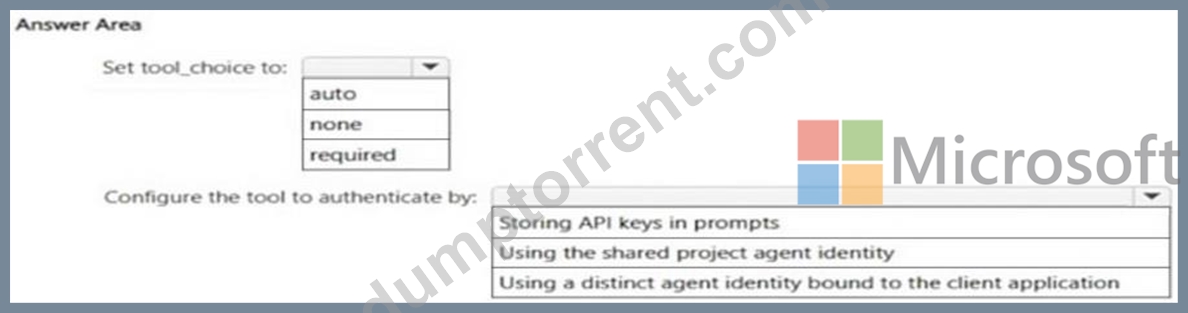
Answer:
Explanation: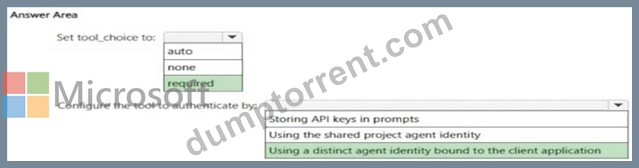
NEW QUESTION # 50
Note: This section contains one or more sets of questions with the same scenario and problem. Each question presents a unique solution to the problem. You must determine whether the solution meets the stated goals. More than one solution in the set might solve the problem. It is also possible that none of the solutions in the set solve the problem.
After you answer a question in this section, you will NOT be able to return. As a result, these questions do not appear on the Review Screen.
You have a Microsoft Foundry project that contains an agent. The agent generates summaries from retrieved policy documents.
Users report that some responses omit required regulatory clauses, even when the clauses are present in the retrieved content.
You need to improve response completeness.
Solution: You run an evaluation flow that scores responses for completeness and blocks responses that fall below a defined threshold.
Does this meet the goal?
- A. Yes
- B. No
Answer: B
Explanation:
The solution does not meet the goal. A completeness evaluation flow is useful for detecting incomplete responses, but detection and blocking do not improve the response itself. Microsoft Foundry RAG evaluators define Response Completeness as a metric that measures whether a response covers all critical information from the expected response or ground truth. It is a system evaluation signal used to assess response quality and produce pass/fail or scored results.
In this scenario, the issue is that the agent omits required regulatory clauses even though the clauses are present in retrieved content. Blocking low-scoring responses would prevent incomplete answers from being returned, but it would not revise the summary, add the missing clauses, or improve the generation process.
The appropriate improvement is to add a response-generation control such as a reflection or verification pass that checks the draft summary against the retrieved policy content and regenerates or amends the answer before returning it. Evaluation can support the quality gate, but by itself it is an assessment mechanism, not a completeness-enhancement mechanism. Reference topics: Microsoft Foundry RAG evaluators, response completeness, grounded generation, reflection, and response quality optimization.
NEW QUESTION # 51
You build a chatbot that uses the Azure OpenAI GPT-4 model to generate song lyrics.
You need to ensure that responses do NOT contain lyrics from popular songs that might have been ingested during model training.
Which Azure AI Content Safety API should you use?
- A. Custom categories
- B. Protected material text detection
- C. Groundedness detection
- D. Analyze Text
Answer: B
Explanation:
The Protected material text detection feature in Azure AI Content Safety is specifically designed to identify and block responses that may contain copyrighted or protected content, such as lyrics from popular songs. Since GPT-4 may have been trained on publicly available data, this feature helps ensure that the chatbot does not generate copyrighted lyrics by detecting and filtering out protected material.
NEW QUESTION # 52
......
AI-103 Exam Dumps Contains FREE Real Quesions from the Actual Exam: https://www.dumptorrent.com/AI-103-braindumps-torrent.html